Best robot vacuum with Bluetooth 2026, picks and comparison
Our comparison covers Bluetooth robot vacuum cleaners on the market, with filters by use and a buying guide covering 5 criteria to help you choose according to your home and network setup.
Prices recorded from retailers are indicative: they may have changed since. The current price is the one shown by the retailer. No price is shown for models sold only on Amazon. Amounts converted from reference prices in euros using an exchange rate from a specified date.
Why these models are listed here
- 2 selected models because they have the feature “Bluetooth” according to data published by manufacturers and retailers.
- View methodology →
- No brand pays to appear in this selection or to rank higher.
Why choose a Bluetooth robot vacuum cleaner over a WiFi model?
How the connection type affects everyday use
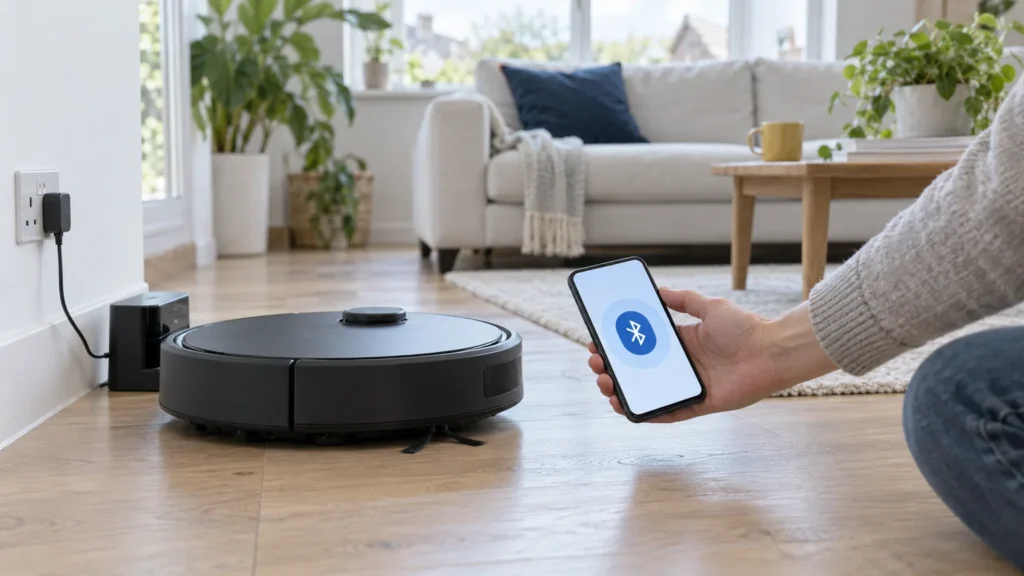
A connected robot vacuum cleaner does not necessarily use WiFi. Bluetooth and WiFi are 2 distinct protocols, with very different ranges and functions. A Bluetooth model communicates directly with your smartphone, without going through your internet router. Its effective range is around 10 m in a home environment, according to standard Bluetooth protocol specifications. A WiFi model, meanwhile, lets you access your network from anywhere: at home, at work or on the move. This difference in range leads to a fundamental difference in use that general comparisons almost always overlook.
What you can actually control using Bluetooth alone
Using a dedicated app, and within range of the robot, you can:
- Start or stop a cleaning cycle
- Select a cleaning mode or suction power
- Track progress in real time on your screen
- Schedule cleaning at set times
However, without WiFi, several functions are unavailable: no control from outside the home, no cloud-stored maps, no integration with voice assistants or home automation routines. This is a deliberate choice based on the intended use, rather than a technical fault.
Households with good reasons to prefer a Bluetooth model
Bluetooth suits specific situations. No mandatory cloud account: the robot's data stays on the device, without being sent to third-party servers. This is a strong argument for users concerned about their digital privacy.
Bluetooth also suits practical constraints:
- A second home or student studio without a fixed internet router, or with an unreliable network
- Immediate initial setup, with no router connection step
- Basement or cellar spaces beyond WiFi range
- More affordable options include Bluetooth models, which often fall into the entry-level category
For a small flat or an open space without complex obstacles, this type of robot is very often sufficient to cover the entire area in 1 cycle without intervention.
Hybrid WiFi and Bluetooth models for those who want the benefits of 2 connection types
The vast majority of mid-range robots combine the 2 protocols. Bluetooth handles initial setup and short-range communication; WiFi takes over for remote control, automatic software updates and multi-floor map synchronisation. This hybrid architecture is found in the most common LiDAR robot vacuum cleaners in 2026, combining precise navigation, control from outside the home and regular updates.
A high-end robot vacuum and mop generally uses WiFi to control integrated emptying or washing stations remotely, a function that Bluetooth alone cannot support. Before comparing suction power or battery life, the connection protocol should therefore be the 1st selection criterion.
The selection on this page combines manufacturer-stated specifications with available aggregated feedback to help you identify the model that suits your circumstances, whether you prioritise the privacy of cloud-free Bluetooth or the flexibility of full WiFi control.
How to choose your Bluetooth robot vacuum cleaner
Choosing a robot vacuum cleaner with Bluetooth involves more than checking a connectivity box. The connection protocol determines which features you can access from your smartphone, the level of data privacy and compatibility with your network setup. Here are the 5 criteria that shape your decision.
Bluetooth only or WiFi+Bluetooth is the first choice to make
The vast majority of current robots offer a hybrid WiFi+Bluetooth connection. Bluetooth handles initial setup and nearby control; WiFi takes over for remote control, software updates and syncing maps to the cloud.
Models with Bluetooth only form a separate category: no mandatory cloud account, data stored locally on the device and operation without an internet router. They are well suited to a studio flat, a second home or any household without a stable WiFi network. The trade-off is that remote control is impossible and advanced features (persistent mapping, home automation integration, voice assistants) are unavailable.
Before buying, check the product specifications to see whether activation requires a cloud account and whether the app supports your version of iOS or Android.
Suction power for your floor type
Manufacturers express suction power in pascals (Pa). This value is measured under laboratory conditions; it provides a basis for comparing models without indicating how they will perform on your particular floor.
- Wooden floors and tiles: moderate suction power is sufficient for fine dust and everyday crumbs.
- Low-pile carpets or flatweave rugs: higher suction power helps clean deeper into the fibres.
- Homes with pets: look for models specifically designed as a robot vacuum cleaner for pet hair.
Navigation suited to your home layout
3 main navigation technologies share the market in 2026:
- Random navigation: the robot moves from obstacle to obstacle without remembering the floor plan. Suited to small, open spaces without low furniture or cables on the floor.
- Camera navigation: visual mapping, effective in well-lit interiors with little clutter.
- LiDAR navigation the laser builds a precise map of the home regardless of ambient light levels. A LiDAR robot vacuum cleaner is recommended for areas larger than around forty square metres or layouts with several connected rooms.
A key consideration is that persistent multi-floor mapping is generally only available on WiFi models. On a Bluetooth-only model, the map is either unavailable or recreated with each cleaning cycle.
Battery life and coverage per charge
Manufacturers measure their stated battery life in economy mode on smooth surfaces without obstacles. Actual battery life is shorter on carpets or at maximum power.
For areas larger than around sixty square metres, automatic recharging with cleaning resumed where it stopped becomes essential. Check that this feature is explicitly mentioned in the product specifications, rather than just the total battery life.
The base station and mopping options
The choice of station affects the budget over time, beyond the initial purchase.
- Automatic emptying station the robot empties itself into a collection bag. Manual intervention becomes less frequent, but replacement bags are a recurring consumable to factor in.
- All-in-one station models such as a robot vacuum and mop with an integrated station also provide automatic washing and drying of the mop pad.
If floor mopping is a priority, check whether the robot offers adjustable water flow and active mechanical pressure on the mop pad. A simple water tank that dampens the pad cannot replace active scrubbing.
| Criterion | What to look for | Common mistake |
|---|---|---|
| Connectivity | Check whether a cloud account is required and whether Bluetooth alone meets your actual needs | Choosing a WiFi+Bluetooth model without checking whether a 2,4 GHz network is available at home |
| Suction power (Pa) | Assess the Pa rating alongside the type of main brush specified by the manufacturer | Comparing Pa ratings across models without considering the floor type or brush design |
| Navigation | LiDAR for homes larger than 40 m² or with an L-shaped layout; random navigation is acceptable in a small open space without complex obstacles | Investing in LiDAR on a Bluetooth-only model without persistent mapping |
| Battery life | Confirm that cleaning resumes automatically after recharging, a more useful criterion than runtime alone | Relying on the advertised battery life without reading the manufacturer's measurement conditions |
| Dock | Calculate the estimated annual cost of consumables (bags, HEPA filters, brushes) before comparing models | Forgetting that an all-in-one dock needs a permanent location and, for some models, access to water |
| App | Check iOS and Android compatibility with your operating system version before buying | Assuming every robot app works on all recent smartphones without checking |
Mistakes to avoid
- Confusing Bluetooth and WiFi on product labels many models advertised as Bluetooth use this protocol only for initial pairing, then switch to WiFi. Read the full technical description before buying.
- Overlooking clearance under furniture measure the clearance under your sofas and low furniture. Product specifications list the robot's height; a difference of a few millimetres is enough to leave the device stuck under furniture.
- Ignoring the maximum threshold height the robot can cross this figure, listed in the manufacturer's specifications, varies by model. A wooden floor threshold or a thick rug can be enough to interrupt an entry-level robot's cleaning cycle.
- Buying based on the Pa rating alone a high Pa rating without a brush suited to your floor provides no additional benefit and reduces runtime per charge.
- Underestimating noise levels manufacturers specify noise levels in decibels, usually measured in quiet mode. At maximum power, the level rises significantly. Schedule cleaning cycles while you are out if this matters to you.
- Overlooking the software update policy some Bluetooth-only models do not receive remote updates. Check the manufacturer's commitments if device lifespan and security matter to you.
Key takeaways
A Bluetooth robot vacuum cleaner meets a specific need: controlling your robot through the app without relying on a cloud service or a stable WiFi network. For a straightforward apartment with no network constraints, this connection mode is often sufficient and offers a real advantage in terms of data privacy.
For a larger home with several rooms, or if you want to start a cleaning cycle remotely, a WiFi+Bluetooth hybrid model with LiDAR navigation and persistent mapping will offer more flexibility day to day.
3 questions guide your choice: which connectivity option suits your setup (available network, whether you accept a cloud account); what floor type and area the robot will need to cover; what level of maintenance you are willing to handle day to day (manual emptying or an automatic station). Everything else adds convenience.
Frequently asked questions about Bluetooth robot vacuum cleaners
Which robot vacuum cleaner is the best choice currently?
There is no universal answer: the best model is the one that suits your home, floors and connection preferences. High-end ranges include LiDAR navigation, an automatic emptying station and integrated mopping; entry-level Bluetooth models remain effective for small, open spaces. First, define your main use (vacuuming only, mopping, pet hair) before comparing specifications.
Which robot vacuum cleaner gets the best reviews?
An analysis of the available specifications shows that feedback tends to favour models combining precise navigation, powerful suction and a stable app. Models with LiDAR mapping and WiFi+Bluetooth connectivity generally offer the most strengths in established comparisons. Bluetooth-only models remain popular for their simplicity and ease of setup in small spaces.
What is the difference between a Bluetooth robot vacuum cleaner and a WiFi model?
A Bluetooth robot vacuum cleaner can be controlled from your smartphone at short range (typically around ten metres in real-world conditions) without using the internet. A WiFi or hybrid WiFi+Bluetooth model allows remote control from anywhere, persistent mapping, remote updates and integration with voice assistants. Bluetooth-only connectivity simplifies operation but limits the functions available through the app.
Does a Bluetooth robot vacuum cleaner work without a home internet connection?
Yes. A Bluetooth robot vacuum cleaner needs neither an internet router nor a cloud account to operate. It communicates directly with your smartphone over a short-range wireless connection. This is its main advantage for a second home, a studio flat or any home without a reliable network.
Can you control a Bluetooth robot vacuum cleaner from outside your home?
No. Bluetooth is a short-range technology: control is only possible near the robot, generally within the same home. To control your device remotely (from the office or while away), you need a WiFi or hybrid WiFi+Bluetooth model. Without an active WiFi connection, remote scheduling and persistent cloud mapping are unavailable.
Which robot vacuum cleaner is best for vacuuming and mopping at the same time?
The vacuuming and mopping robots with 2-in-1 functionality combine vacuuming and a motorised mop in the same unit. The most advanced models include a base station that automatically cleans and dries the mop between cleaning sessions. WiFi+Bluetooth connectivity remains recommended for configuring mopping zones through the app.
Are Bluetooth robot vacuum cleaners more privacy-friendly?
Yes, in most cases. A Bluetooth-only model does not transmit data to remote servers and does not require an account on a cloud platform. Your home's map remains stored locally on the device. For privacy-conscious households, this connection method offers a clear advantage over fully cloud-based models, which transmit the home's floor plan to third-party infrastructure.
Which robot vacuum cleaner should you choose for a small flat or a second home?
For a studio flat or a second home, a Bluetooth robot vacuum cleaner is often the most suitable choice. A LiDAR robot vacuum cleaner with advanced mapping is less essential here than in a large flat.